YAHOO OS - DESIGN SYSTEM
YAHOO OS - DESIGN SYSTEM
2025-2026
2025-2026
See More
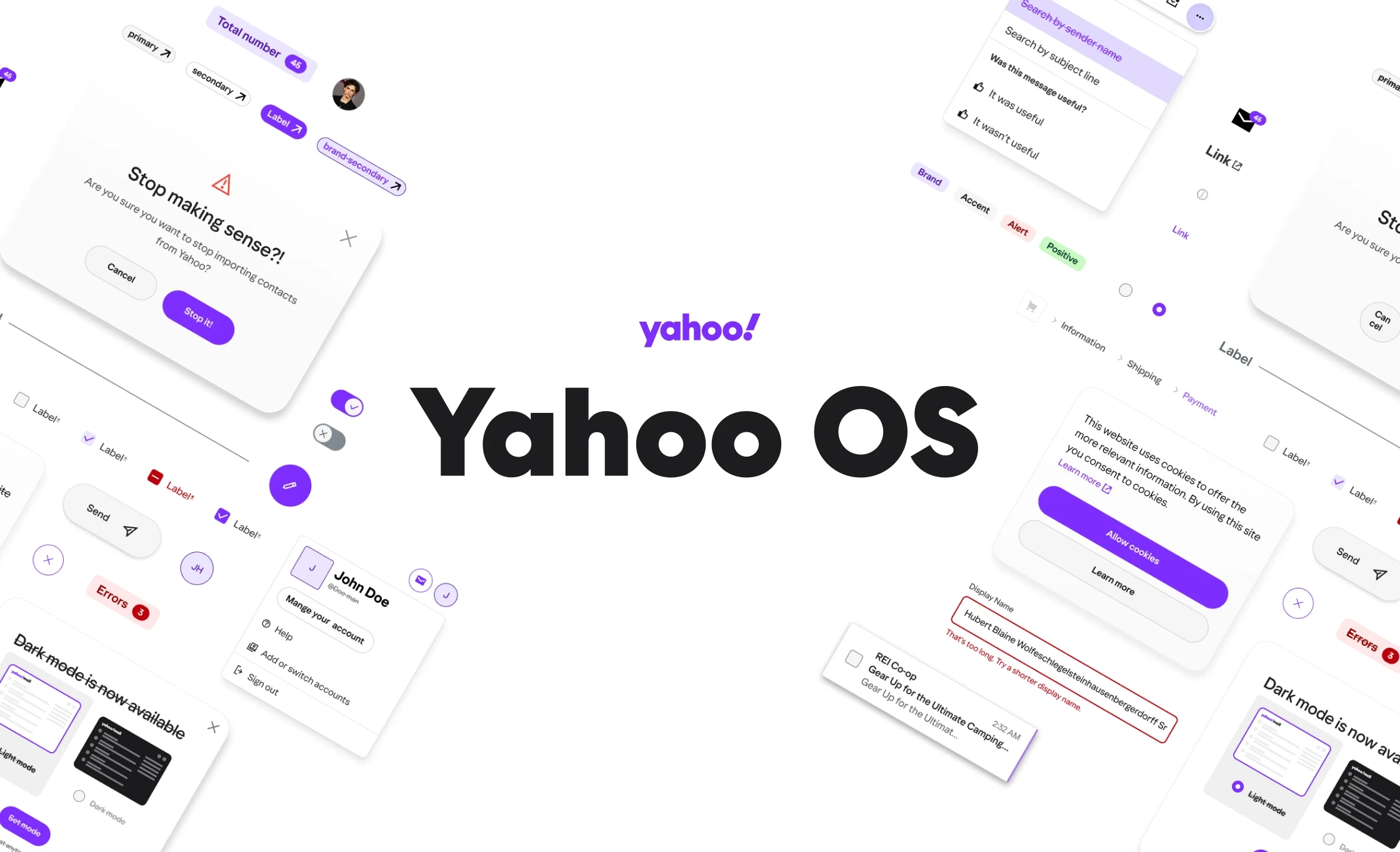
GOAL
Designing a unified design language across Yahoo’s products – from Mail and News to Search and Commerce – to bring consistency, efficiency, and a bit of Yahoo personality to every experience.
ROLE
As part of the horizontal studio team, I lead efforts in the initial "design" of the design system. With close collaboration with stakeholders across all BUs, I helped solidify the foundational elements of the system such as typography, color and shadows and build out the first set of 12 components for the initial MVP.
Company
Yahoo
Time
Aug 1, 2024 - Current
Skills
Product Design
Design System
UI / UX
Tools
Figma
Asana
Slack
Contributions
Design System
Prototyping
Cross Collaboration
Product Design
ROLE
As part of the horizontal studio team, I lead efforts in the initial "design" of the design system. With close collaboration with stakeholders across all BUs, I helped solidify the foundational elements of the system such as typography, color and shadows and build out the first set of 12 components for the initial MVP.
PROBLEM
Yahoo’s product teams were each designing in their own silo, with no single source of truth for UI components or styles. Designers often struggled to find the right fonts, colors, or assets – some even had to ping the central design team asking “Where can I find our UI kit?” We clearly needed one horizontal design system that could span Yahoo Mail, News, Search, Games, and Platforms (internal tools), giving all products a cohesive look and feel.
Another challenge was bridging the gap between brand and product. Yahoo’s brand team had established a new visual direction (vibrant colors, bold graphics, etc.), but it was very marketing-oriented. My job was to help reinterpret that brand style into a product-ready design system – something flexible and pragmatic that UI designers and front-end developers could actually use in apps and websites. This meant translating high-level brand guidelines into consistent components, patterns, and design tokens that would work across many platforms and themes.
Yahoo’s product teams were each designing in their own silo, with no single source of truth for UI components or styles. Designers often struggled to find the right fonts, colors, or assets – some even had to ping the central design team asking “Where can I find our UI kit?” We clearly needed one horizontal design system that could span Yahoo Mail, News, Search, Games, and Platforms (internal tools), giving all products a cohesive look and feel.
Another challenge was bridging the gap between brand and product. Yahoo’s brand team had established a new visual direction (vibrant colors, bold graphics, etc.), but it was very marketing-oriented. My job was to help reinterpret that brand style into a product-ready design system – something flexible and pragmatic that UI designers and front-end developers could actually use in apps and websites. This meant translating high-level brand guidelines into consistent components, patterns, and design tokens that would work across many platforms and themes.
PROCESS
I joined forces with Yahoo’s internal Design Studio team to envision and build the Yahoo OS design system (our internal nickname for the unified system). I partnered with another design system lead on the project, and together we worked closely with a dedicated front-end engineering team. We chose Tailwind CSS as the foundation for our component library and made heavy use of Figma’s new Code Connect features – this way our Figma components were directly linked to live code components, keeping designers and developers in sync. Early in the project, we put together a “sticker sheet” of sample UI elements and a themed style guide; I even got to present these early concepts to Yahoo’s COO to get buy-in on our direction before we dove into full-scale development.
I joined forces with Yahoo’s internal Design Studio team to envision and build the Yahoo OS design system (our internal nickname for the unified system). I partnered with another design system lead on the project, and together we worked closely with a dedicated front-end engineering team. We chose Tailwind CSS as the foundation for our component library and made heavy use of Figma’s new Code Connect features – this way our Figma components were directly linked to live code components, keeping designers and developers in sync. Early in the project, we put together a “sticker sheet” of sample UI elements and a themed style guide; I even got to present these early concepts to Yahoo’s COO to get buy-in on our direction before we dove into full-scale development.
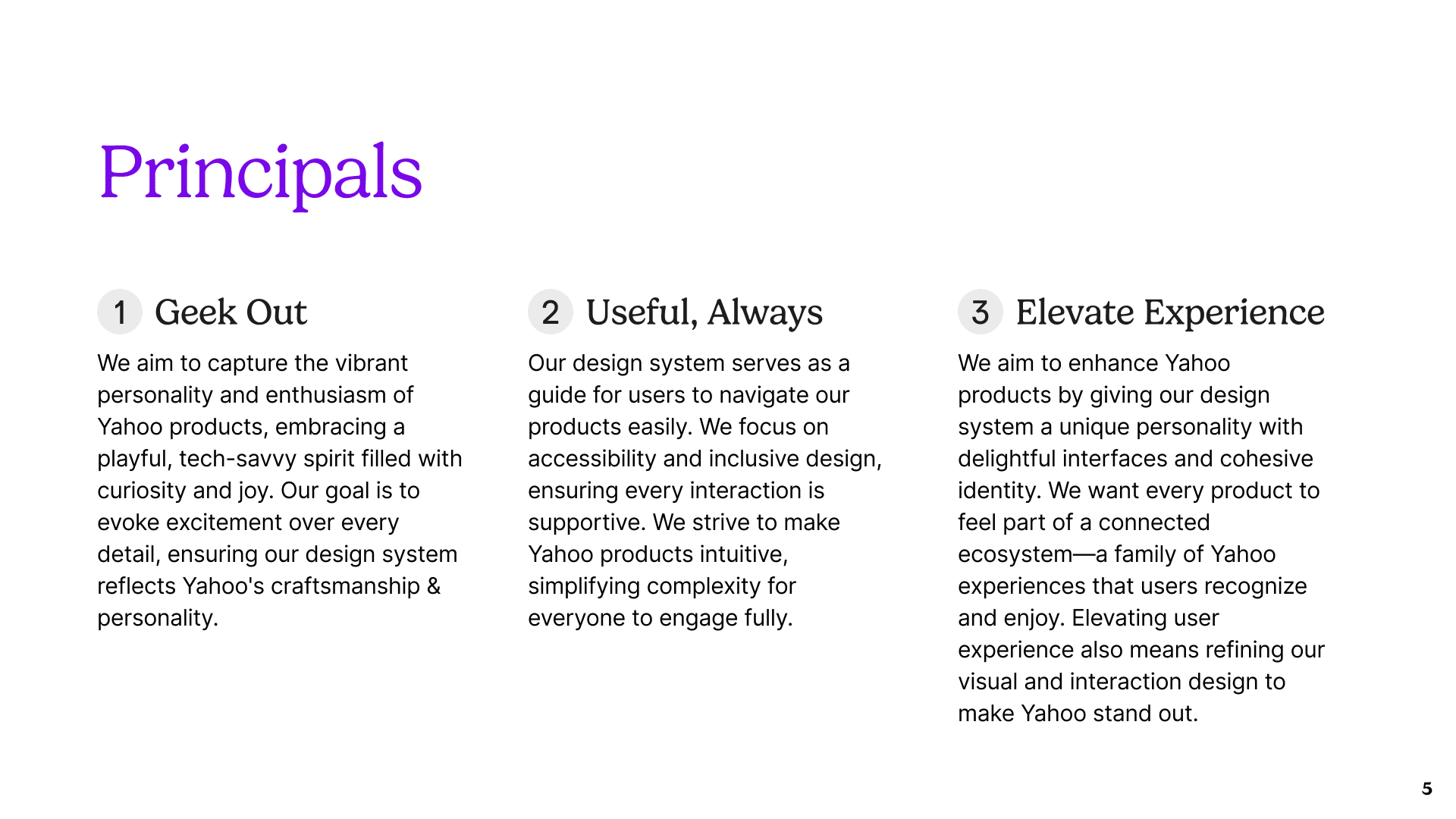
Early in the process, we defined core design principles to guide Yahoo’s new design language – from embracing a playful, tech-savvy spirit (“Geek Out”) to ensuring every interface is intuitive and accessible (“Useful, Always”). These principles helped us maintain Yahoo’s unique personality while building a practical, cohesive system.
Early in the process, we defined core design principles to guide Yahoo’s new design language – from embracing a playful, tech-savvy spirit (“Geek Out”) to ensuring every interface is intuitive and accessible (“Useful, Always”). These principles helped us maintain Yahoo’s unique personality while building a practical, cohesive system.
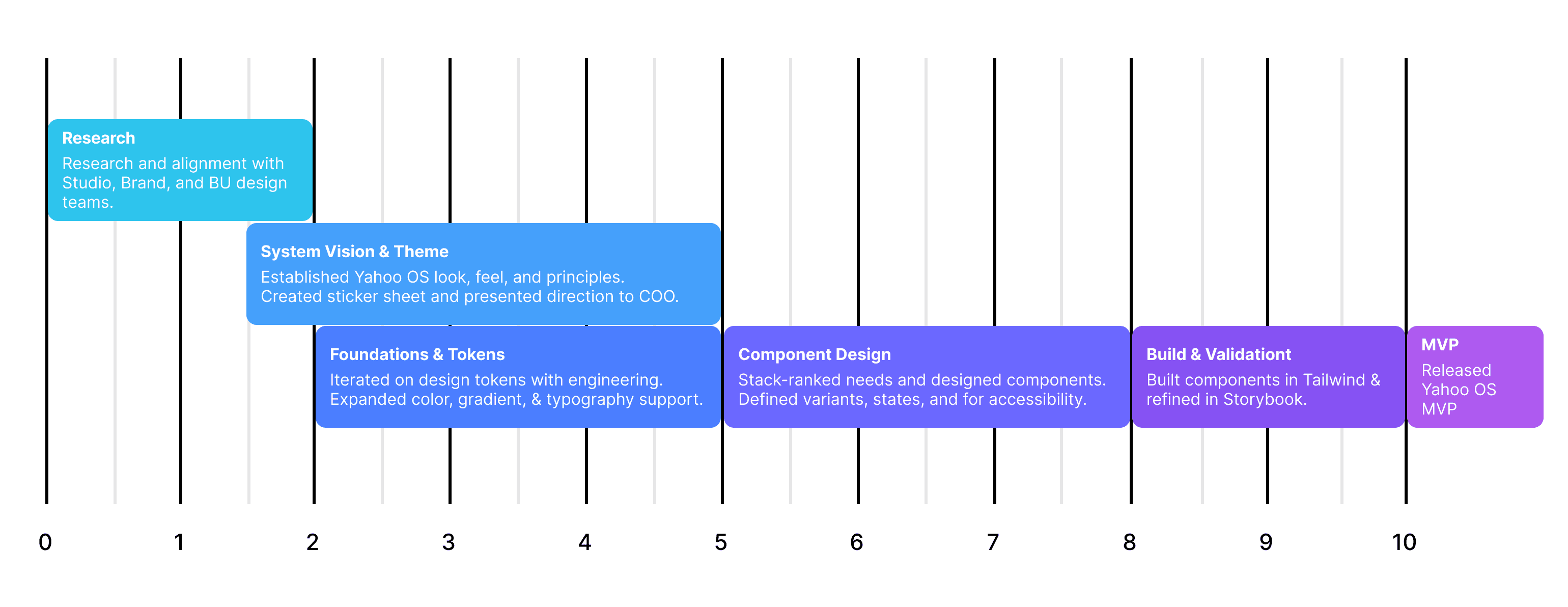
Gather & Align
We kicked off by gathering feedback from each business unit’s design team. I held workshops and 1:1 chats with designers from Mail, News, Sports, Finance, etc., to hear their pain points and wish-lists. This ensured the system would solve real problems (for example, consistent navigation headers for News, or updated card patterns for Finance) and address common UI needs across the board.
Gather & Align
We kicked off by gathering feedback from each business unit’s design team. I held workshops and 1:1 chats with designers from Mail, News, Sports, Finance, etc., to hear their pain points and wish-lists. This ensured the system would solve real problems (for example, consistent navigation headers for News, or updated card patterns for Finance) and address common UI needs across the board.
Prioritize Components
Using that input, we mapped out a roadmap of components and patterns. We stack-ranked each component by impact and effort – focusing first on high-impact, widely used UI elements that would immediately benefit multiple products. For instance, a new button style and form fields were top priority since they appear everywhere; more niche components specific to one product were scheduled later.
Prioritize Components
Using that input, we mapped out a roadmap of components and patterns. We stack-ranked each component by impact and effort – focusing first on high-impact, widely used UI elements that would immediately benefit multiple products. For instance, a new button style and form fields were top priority since they appear everywhere; more niche components specific to one product were scheduled later.
Design & Iterate
I then designed each component in Figma with a focus on visual consistency and scalability. We created a modular set of styles – leveraging Figma variables for themes, spacing, color palettes, and typography – so every component could automatically switch between light/dark mode and adapt to various branding needs. Throughout this phase I collaborated with the other design lead to review and refine every detail (from button hover states to card shadows) to ensure a polished, unified aesthetic.
Design & Iterate
I then designed each component in Figma with a focus on visual consistency and scalability. We created a modular set of styles – leveraging Figma variables for themes, spacing, color palettes, and typography – so every component could automatically switch between light/dark mode and adapt to various branding needs. Throughout this phase I collaborated with the other design lead to review and refine every detail (from button hover states to card shadows) to ensure a polished, unified aesthetic.
Build & Test
As designs matured, our engineering team built the components in code. We worked in tandem – thanks to Figma’s Code Connect and Dev Mode, developers could grab exact values and even link React components to our Figma components. I joined daily stand-ups with engineers and used Storybook as our single source of truth for coded components. We reviewed each component in Storybook together, catching any discrepancies and ensuring the final implementation matched the Figma designs pixel-perfect.
Build & Test
As designs matured, our engineering team built the components in code. We worked in tandem – thanks to Figma’s Code Connect and Dev Mode, developers could grab exact values and even link React components to our Figma components. I joined daily stand-ups with engineers and used Storybook as our single source of truth for coded components. We reviewed each component in Storybook together, catching any discrepancies and ensuring the final implementation matched the Figma designs pixel-perfect.
Launch & Rollout
Once a batch of components was ready, we rolled it out to the various product teams. We documented usage guidelines and helped teams replace old UI with the new standardized components. This rollout wasn’t a one-time event; we continuously updated the library. I regularly hosted internal “roadshow” demos for the wider design org to showcase new components or improvements, answer questions, and basically evangelizethe design system so everyone was on board.
Launch & Rollout
Once a batch of components was ready, we rolled it out to the various product teams. We documented usage guidelines and helped teams replace old UI with the new standardized components. This rollout wasn’t a one-time event; we continuously updated the library. I regularly hosted internal “roadshow” demos for the wider design org to showcase new components or improvements, answer questions, and basically evangelizethe design system so everyone was on board.
Prioritize Components
Using that input, we mapped out a roadmap of components and patterns. We stack-ranked each component by impact and effort – focusing first on high-impact, widely used UI elements that would immediately benefit multiple products. For instance, a new button style and form fields were top priority since they appear everywhere; more niche components specific to one product were scheduled later.
MVP PROCESS
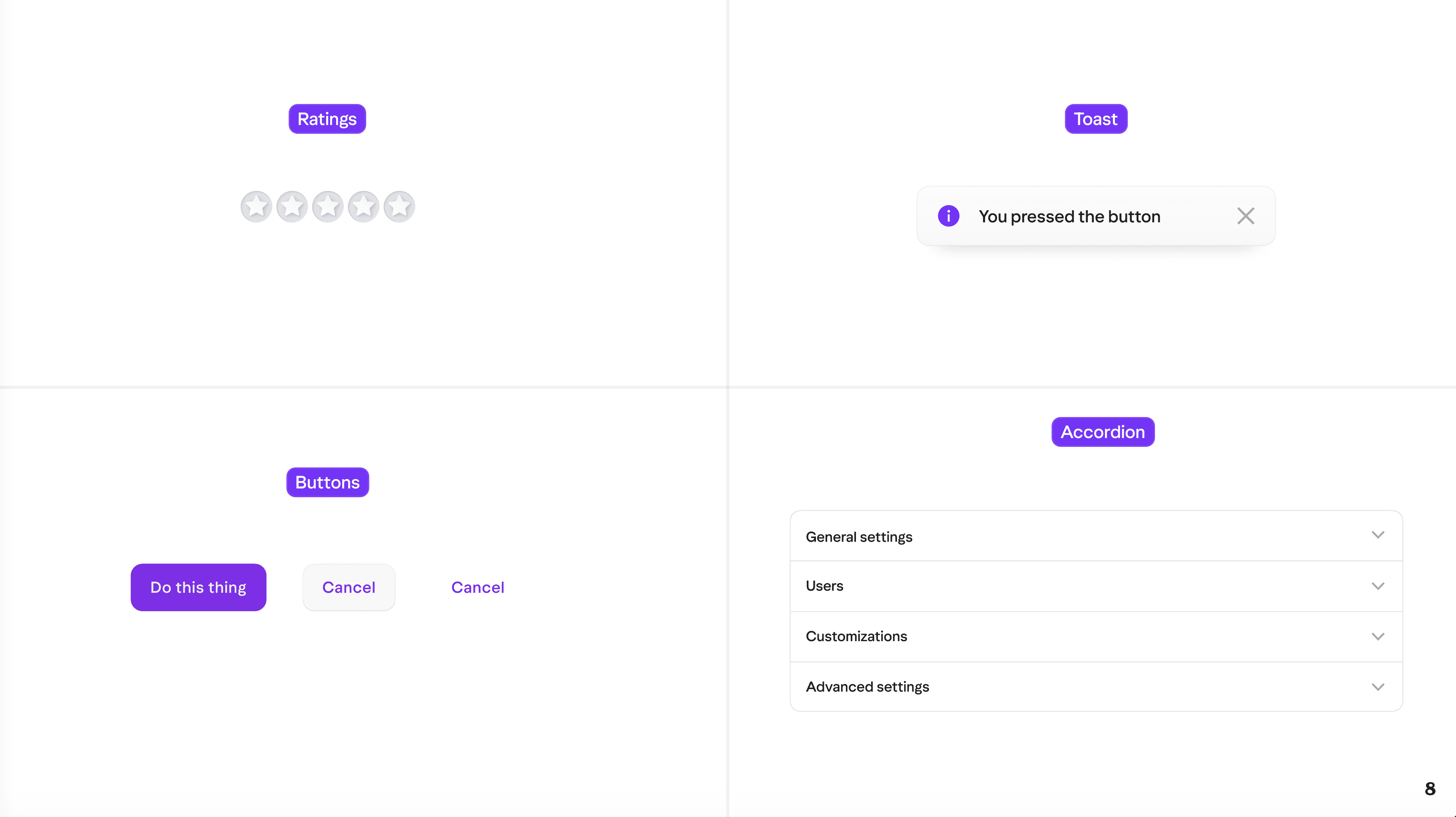
We designed a wide range of UI components to populate the system – from fundamentals like buttons, forms, and navigation menus to fun extras like rating stars and tooltips. Each component was crafted to be themable and accessible, ensuring a consistent look in both light and dark modes across Yahoo’s products.
We designed a wide range of UI components to populate the system – from fundamentals like buttons, forms, and navigation menus to fun extras like rating stars and tooltips. Each component was crafted to be themable and accessible, ensuring a consistent look in both light and dark modes across Yahoo’s products.
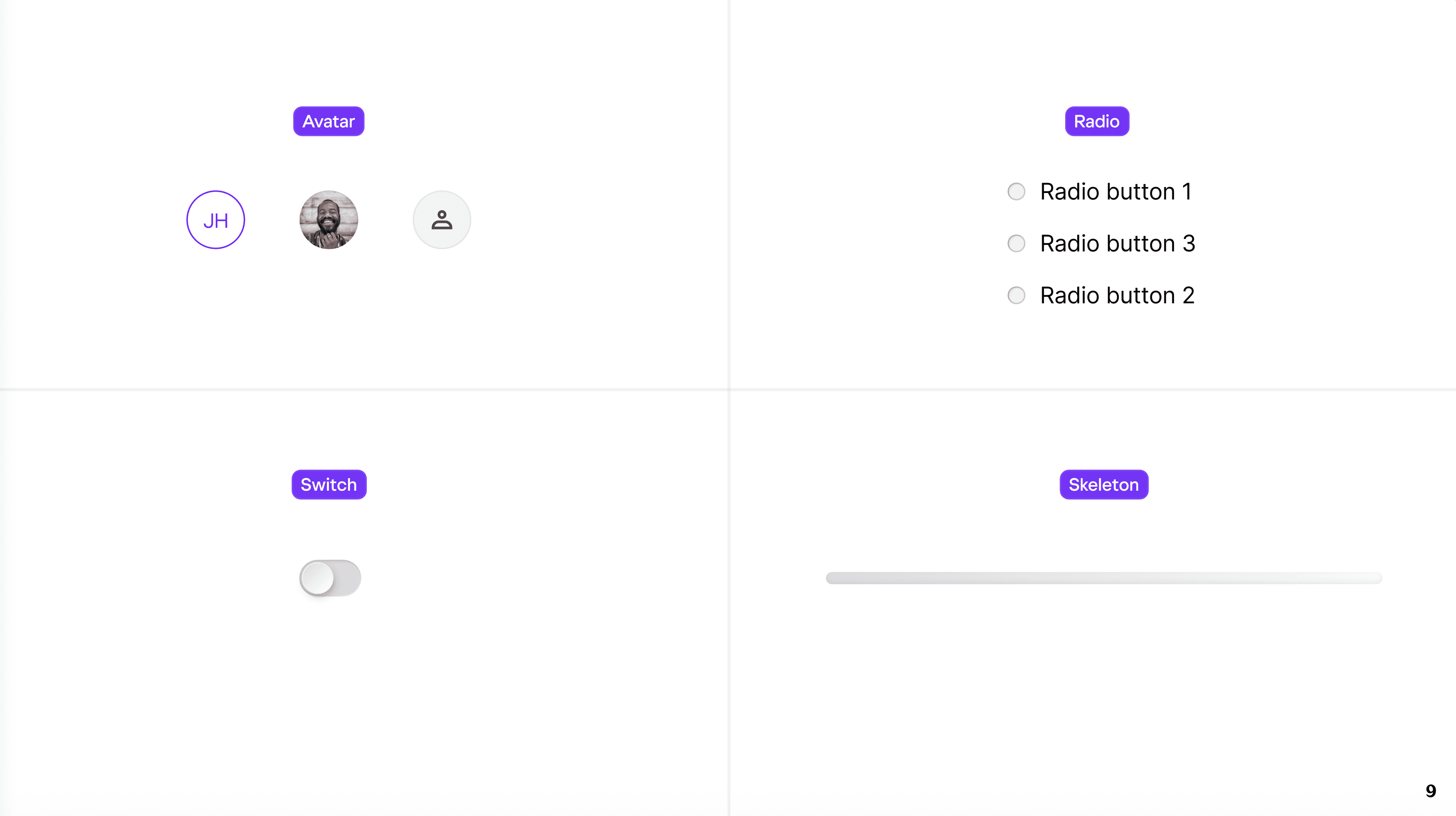
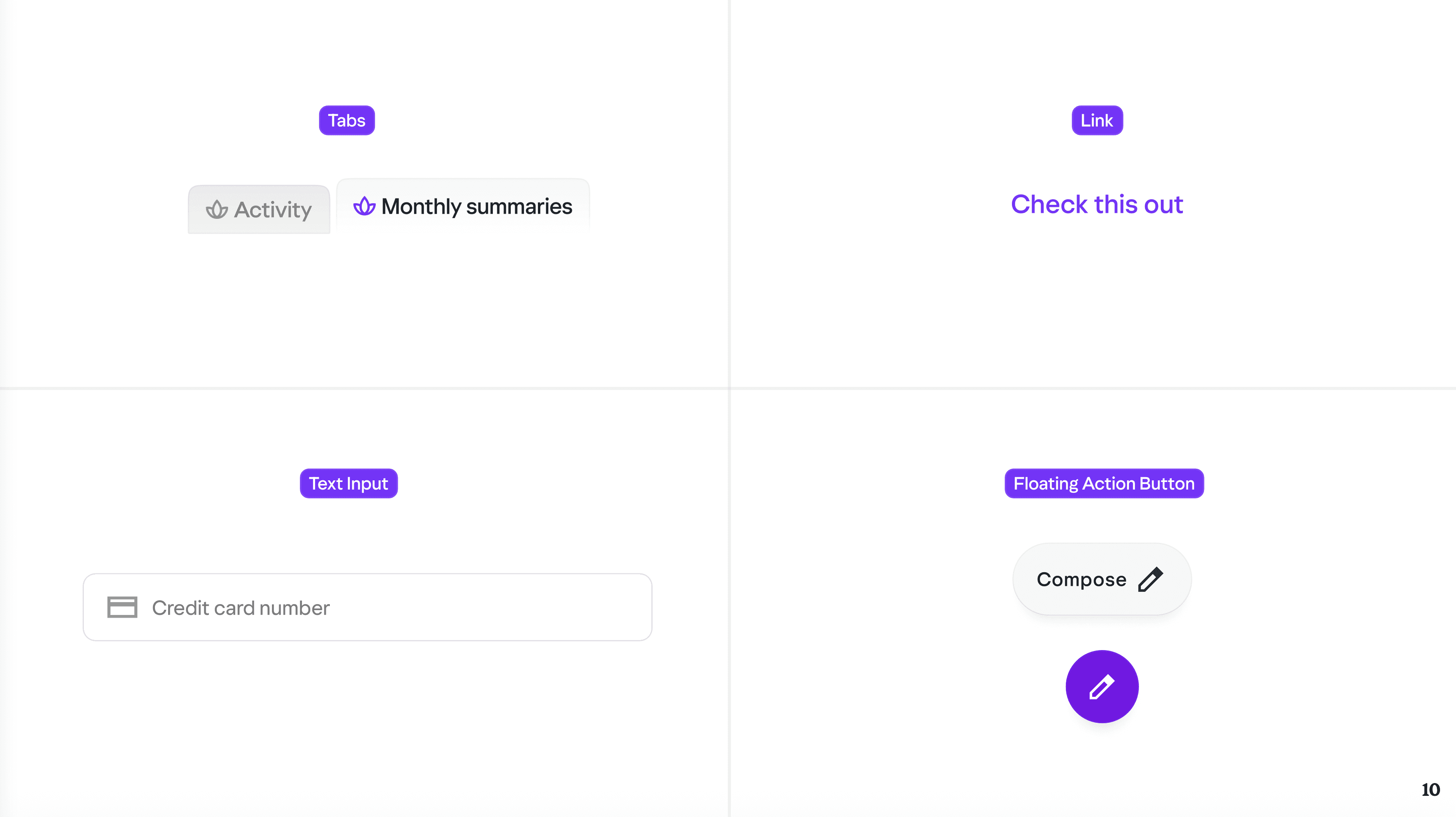
Throughout the process, we maintained a casual but productive collaboration style – lots of Slack chatter, quick design reviews, and iterative updates. By involving the product designers early and often, we built trust in the system. Teams started adopting our components even before we finished the whole library, giving us valuable early feedback and momentum.
Throughout the process, we maintained a casual but productive collaboration style – lots of Slack chatter, quick design reviews, and iterative updates. By involving the product designers early and often, we built trust in the system. Teams started adopting our components even before we finished the whole library, giving us valuable early feedback and momentum.
OUTCOME
The result was a unified design system that now powers the UI of Yahoo’s major products. We delivered a comprehensive Figma library of dozens of components, all aligned to the new Yahoo OS style. Designers across Yahoo finally have that one-click source of truth for UX patterns – no more guessing or hunting for the latest widget. The products themselves now feel like a family: you can jump from Yahoo Mail to Yahoo News to Yahoo Search and sense the shared DNA in the buttons, layouts, and typography. This consistency not only improves user experience but also reinforces Yahoo’s brand identity in a subtle, cohesive way.
Importantly, the Yahoo OS design system is now a living product. We didn’t just hand it off and walk away – it’s continuously evolving. My team keeps updating and expanding the system as new needs arise. We’ve added new components (like an updated date picker and rich text editor) and refined existing ones based on real-world usage. The ongoing “roadshows” and open feedback channels have kept designers and developers engaged, so adoption of the system keeps growing. It’s really rewarding to see teams across Yahoo enthusiastically using the system and even contributing back to it.
The result was a unified design system that now powers the UI of Yahoo’s major products. We delivered a comprehensive Figma library of dozens of components, all aligned to the new Yahoo OS style. Designers across Yahoo finally have that one-click source of truth for UX patterns – no more guessing or hunting for the latest widget. The products themselves now feel like a family: you can jump from Yahoo Mail to Yahoo News to Yahoo Search and sense the shared DNA in the buttons, layouts, and typography. This consistency not only improves user experience but also reinforces Yahoo’s brand identity in a subtle, cohesive way.
Importantly, the Yahoo OS design system is now a living product. We didn’t just hand it off and walk away – it’s continuously evolving. My team keeps updating and expanding the system as new needs arise. We’ve added new components (like an updated date picker and rich text editor) and refined existing ones based on real-world usage. The ongoing “roadshows” and open feedback channels have kept designers and developers engaged, so adoption of the system keeps growing. It’s really rewarding to see teams across Yahoo enthusiastically using the system and even contributing back to it.
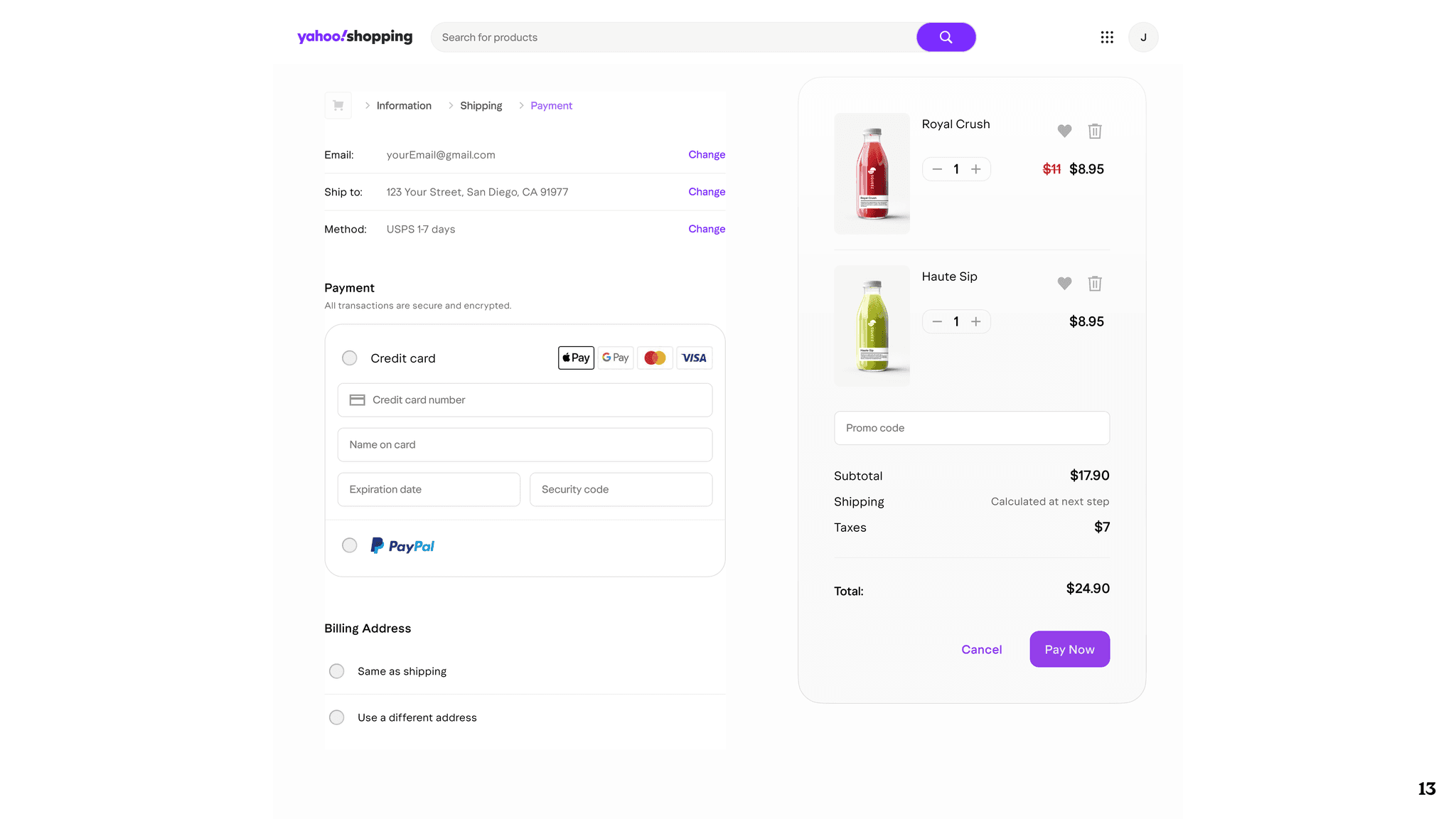
Below is a preview of the design system in action.
Below is a preview of the design system in action.
RESULTS
TOKENS
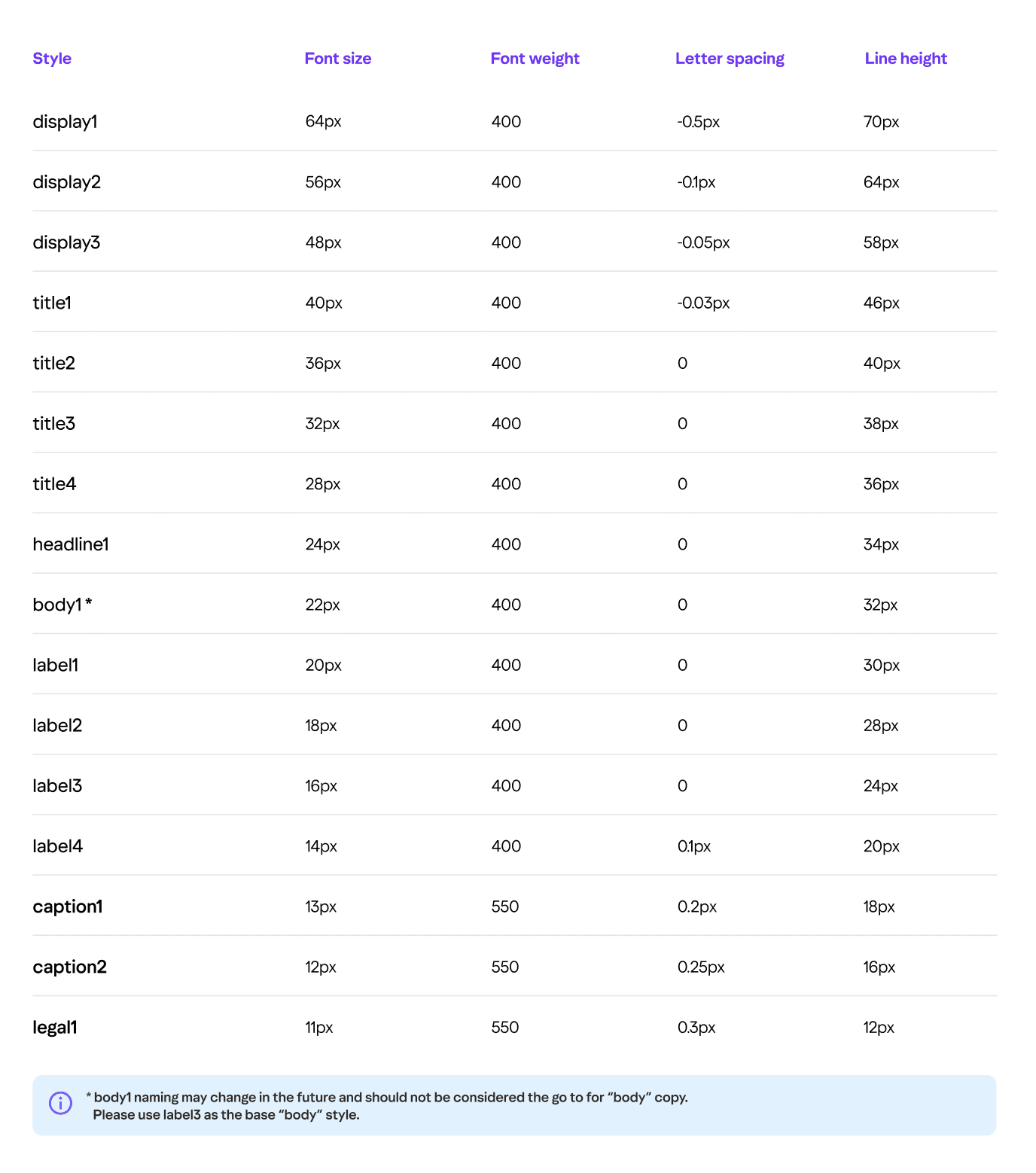
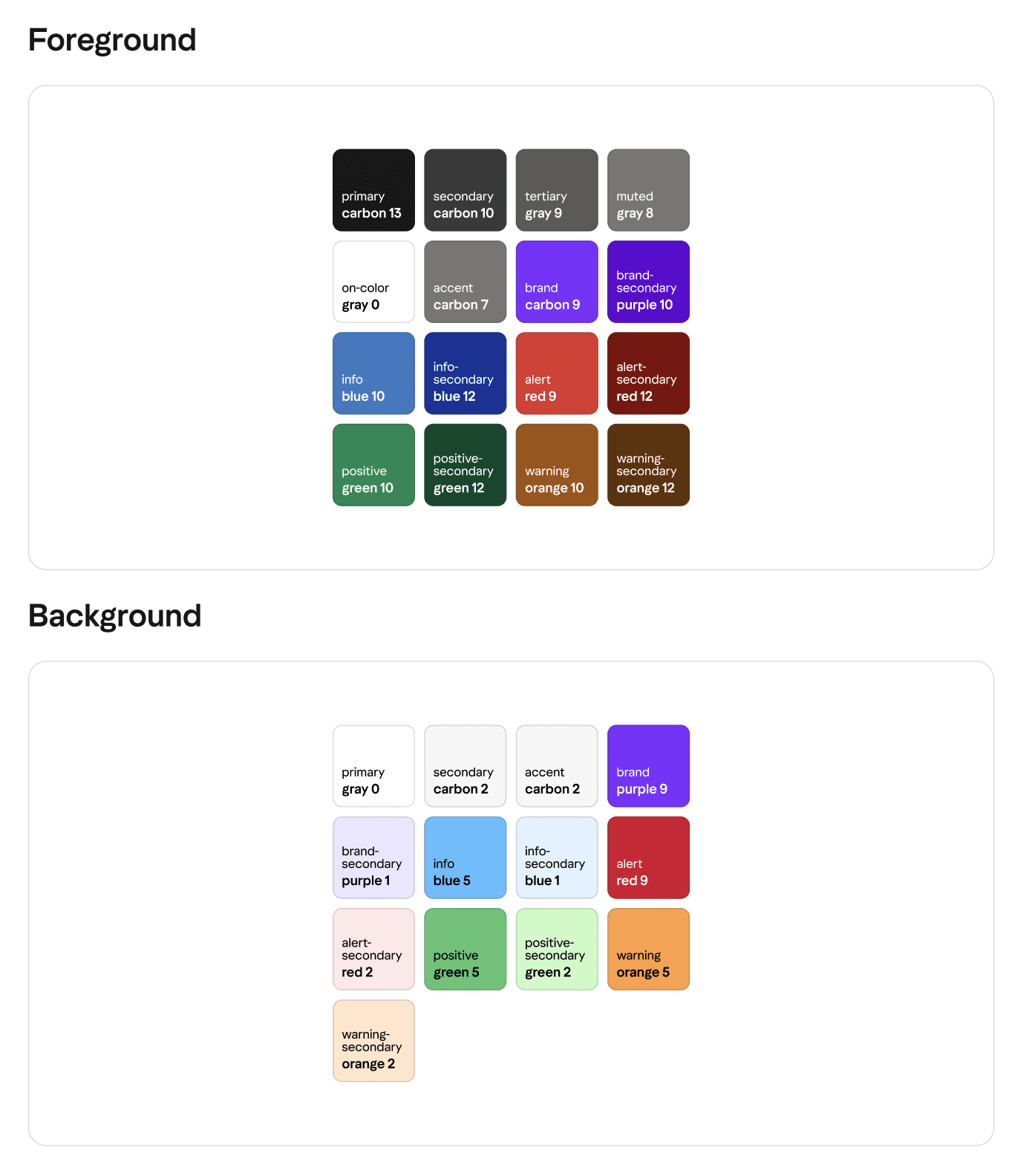
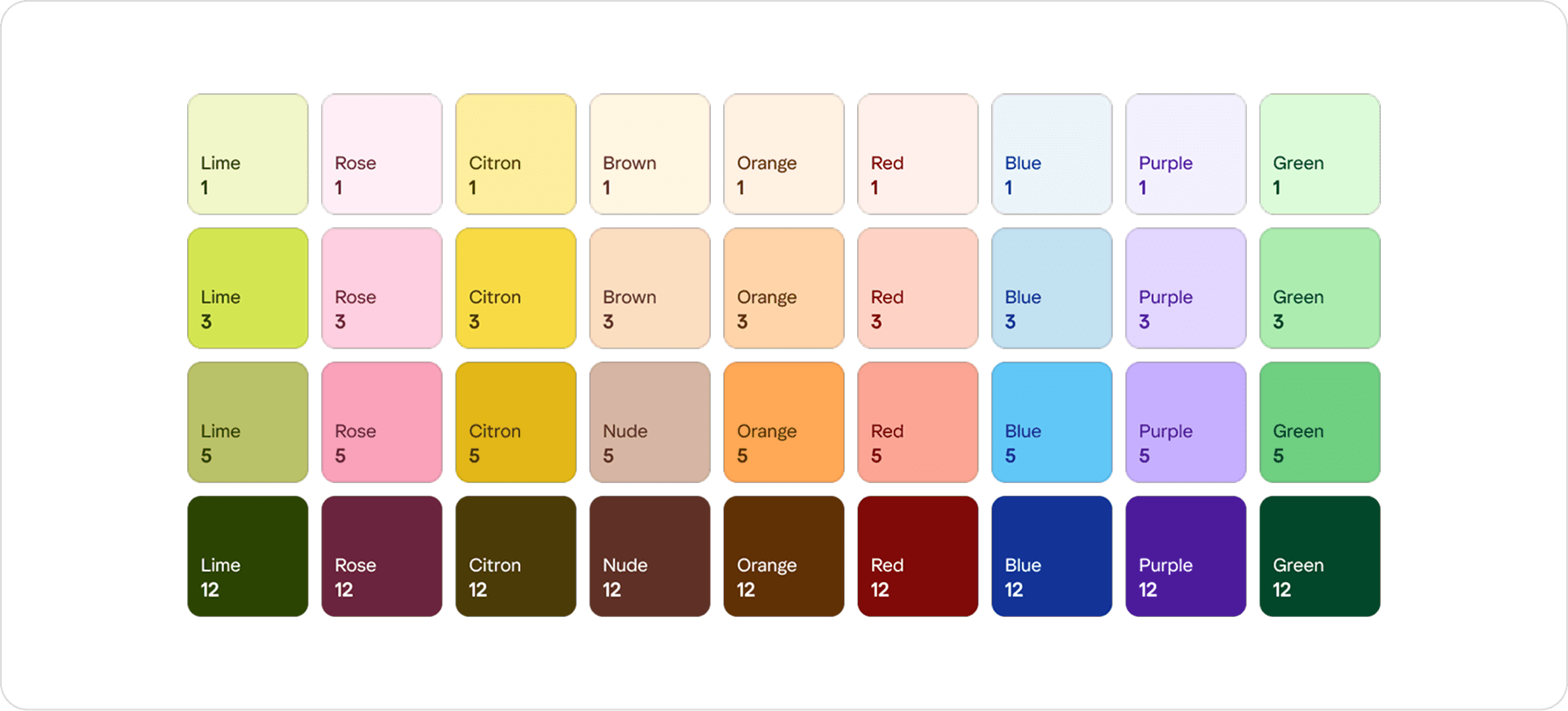
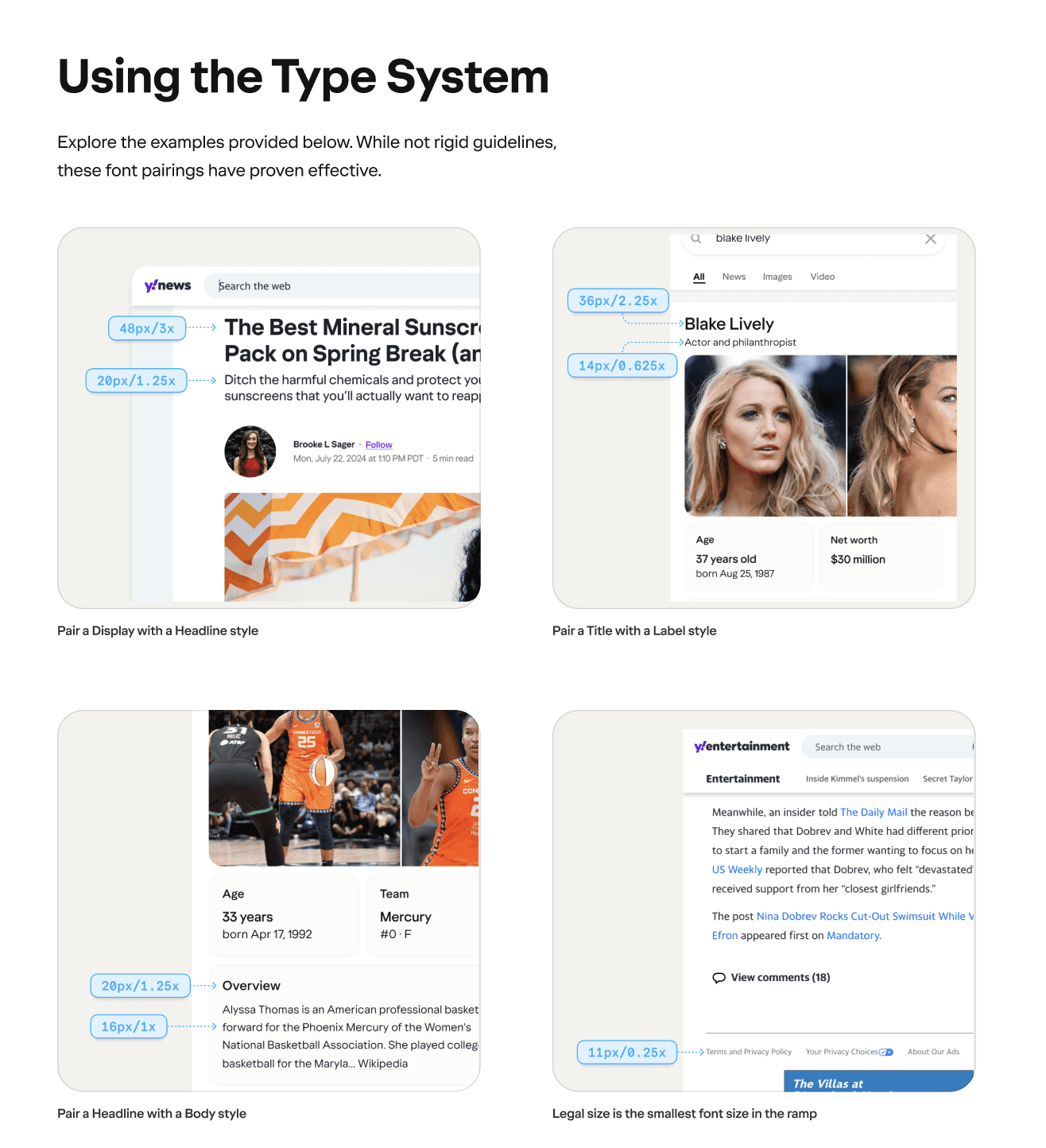
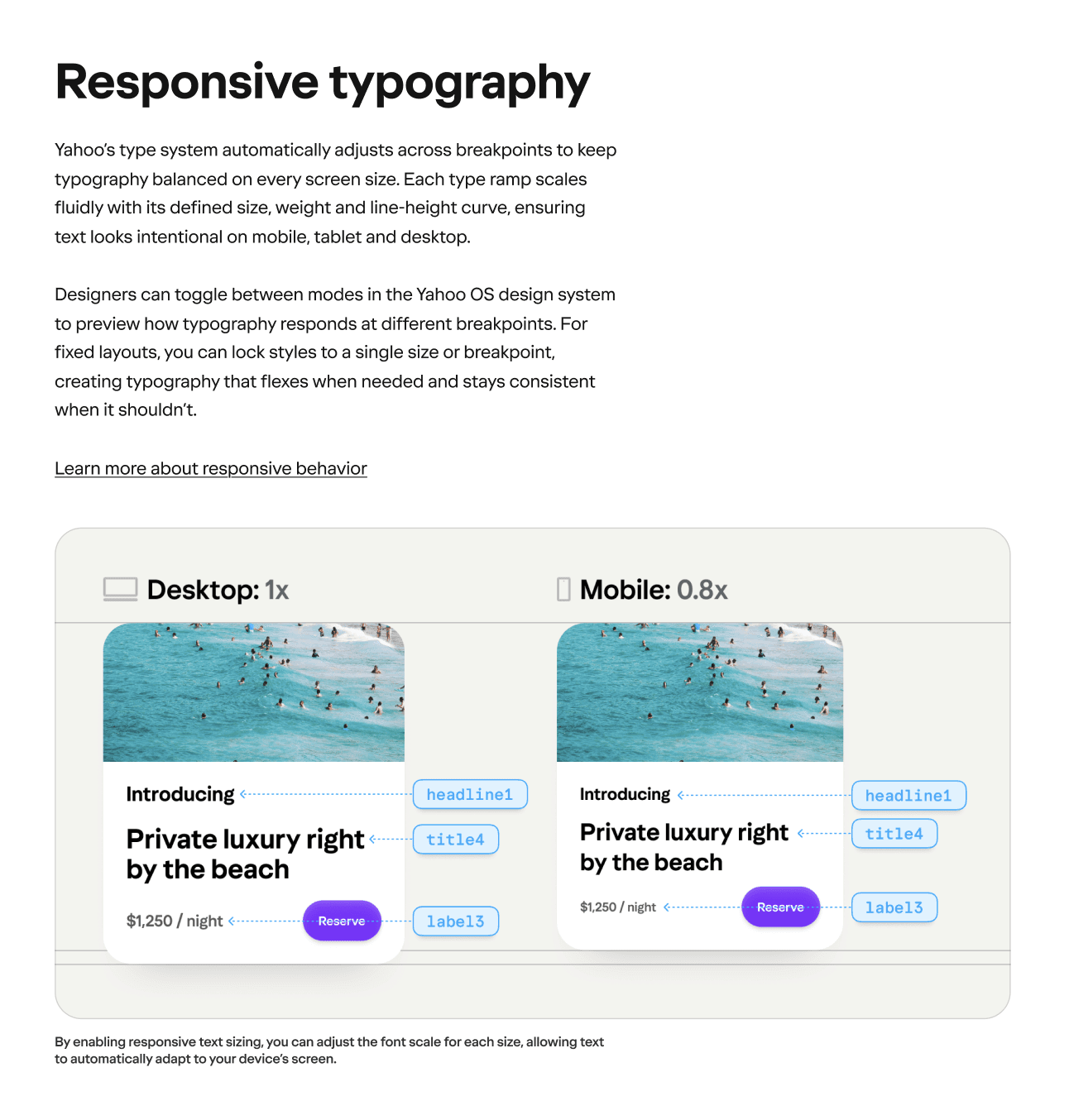
Lastly, we laid a strong foundation with design tokens. I helped define the core tokens for things like colors (with semantic naming for themes), font sizes & line-heights, spacing units, border radii, and more. This token-driven approach means our theming is super flexible – for example, we can apply a special seasonal theme or a partner brand’s colors just by tweaking tokens, and the components update instantly. I worked closely with developers to integrate these tokens into the codebase (so tokens sync between Figma and code). This collaboration even led us to extend the token system’s expressiveness – making sure we could handle edge cases like dynamic gradients or additional breakpoints as new products demanded them.
Lastly, we laid a strong foundation with design tokens. I helped define the core tokens for things like colors (with semantic naming for themes), font sizes & line-heights, spacing units, border radii, and more. This token-driven approach means our theming is super flexible – for example, we can apply a special seasonal theme or a partner brand’s colors just by tweaking tokens, and the components update instantly. I worked closely with developers to integrate these tokens into the codebase (so tokens sync between Figma and code). This collaboration even led us to extend the token system’s expressiveness – making sure we could handle edge cases like dynamic gradients or additional breakpoints as new products demanded them.
DOCUMENTATION SITE
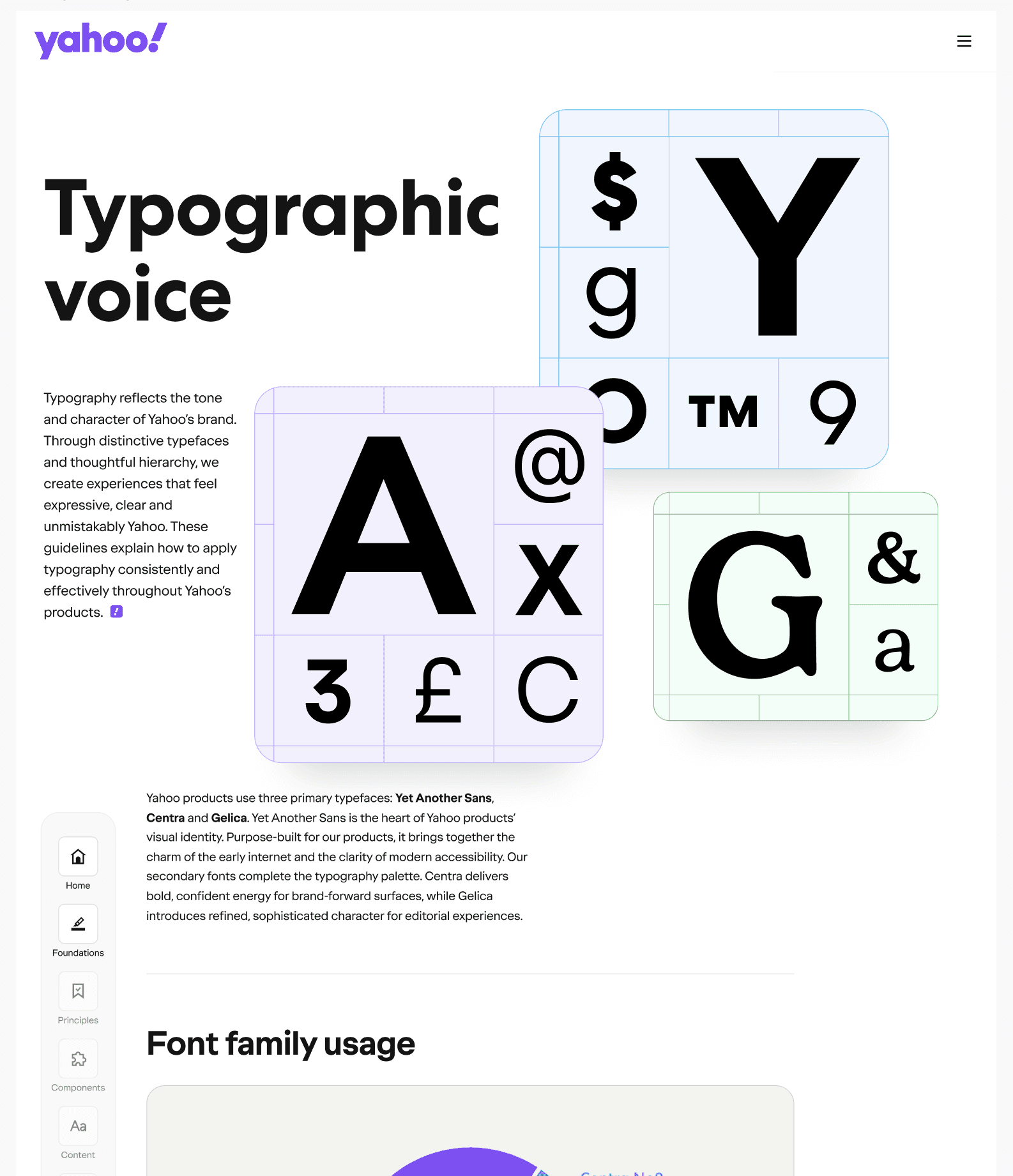
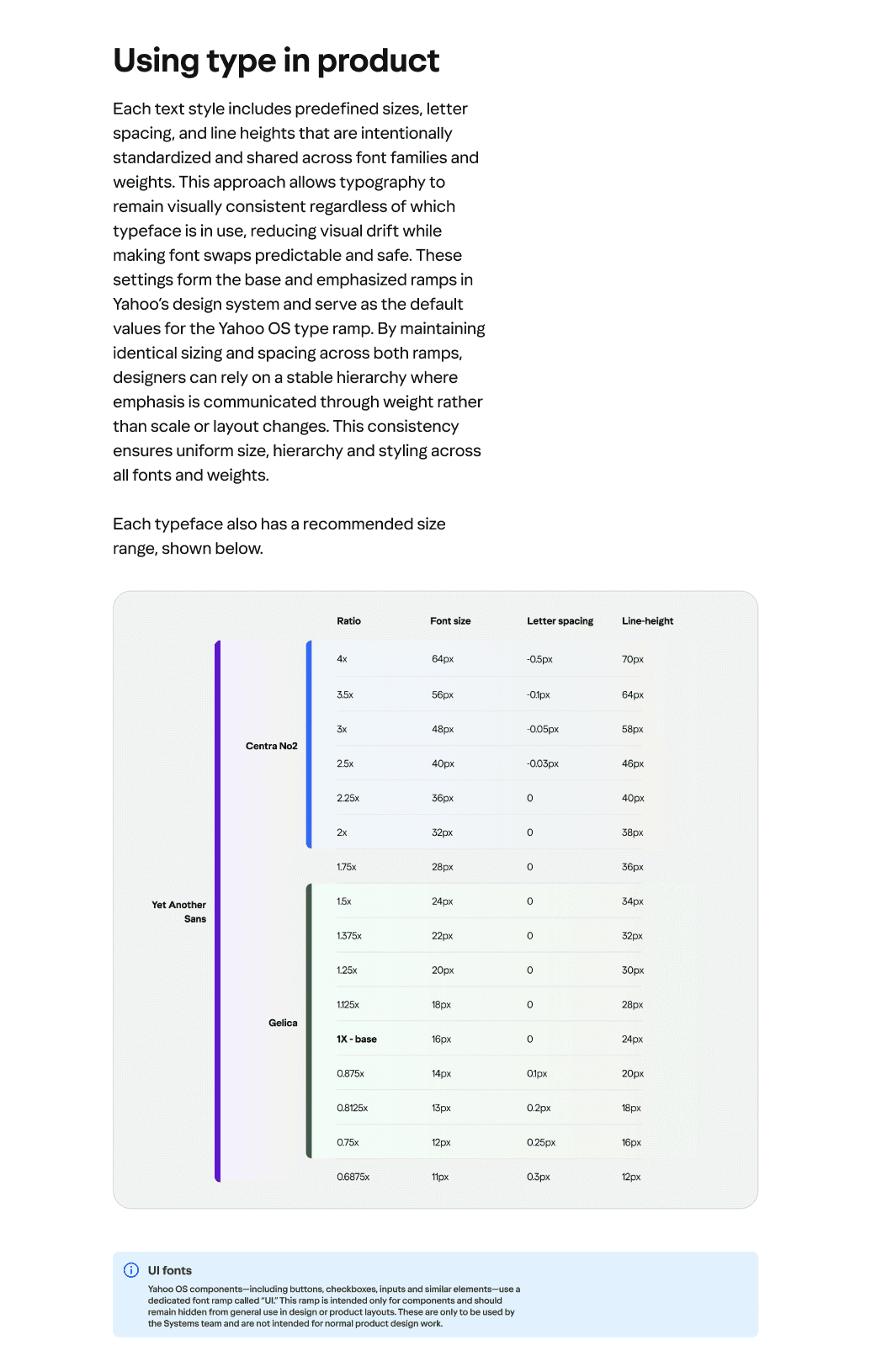
One of our proudest achievements is the Yahoo Design System documentation site. I spearheaded the creation of an extensive style guide website (built on Figma’s Design Docs platform, with a lot of custom code for branding). This site serves as a one-stop hub for everyone – it outlines our design principles, visual guidelines, and detailed specs for every component. We included sections for spacing scale, color palettes and gradients, typography ramps, iconography, illustration style, accessibility standards, and even content guidelines for tone of voice. (We took inspiration from the excellent eBay Design Playbook site) The documentation is interactive and always up to date with the latest Figma assets, which has been amazing for onboarding new designers and keeping engineers aligned on the intended behavior of each UI element.
One of our proudest achievements is the Yahoo Design System documentation site. I spearheaded the creation of an extensive style guide website (built on Figma’s Design Docs platform, with a lot of custom code for branding). This site serves as a one-stop hub for everyone – it outlines our design principles, visual guidelines, and detailed specs for every component. We included sections for spacing scale, color palettes and gradients, typography ramps, iconography, illustration style, accessibility standards, and even content guidelines for tone of voice. (We took inspiration from the excellent eBay Design Playbook site) The documentation is interactive and always up to date with the latest Figma assets, which has been amazing for onboarding new designers and keeping engineers aligned on the intended behavior of each UI element.
Overall, the Yahoo OS design system has been a game changer. It not only solved the original challenges (now everyone knows where to find the latest UI components!), but it also established a new way of working at Yahoo – more collaboration between teams, faster design-to-development cycles (thanks to things like Code Connect), and a stronger, more consistent user experience across a half-dozen products. And perhaps best of all, it injected a fresh sense of pride and identity into Yahoo’s products; we’ve crafted a modern, playful Yahoo look that users can recognize and love, no matter which Yahoo app they’re using.
Overall, the Yahoo OS design system has been a game changer. It not only solved the original challenges (now everyone knows where to find the latest UI components!), but it also established a new way of working at Yahoo – more collaboration between teams, faster design-to-development cycles (thanks to things like Code Connect), and a stronger, more consistent user experience across a half-dozen products. And perhaps best of all, it injected a fresh sense of pride and identity into Yahoo’s products; we’ve crafted a modern, playful Yahoo look that users can recognize and love, no matter which Yahoo app they’re using.
More Case Studies

A
A
N
N
D
D
R
R
E
E
W
W
J
J
A
A
S
S
P
P
E
E
R
R
UI/UX PRODUCT DESIGNER
UI/UX PRODUCT
DESIGNER

©2026 Andrew Jasper
Site designed and developed by Jasper. All Rights Reserved.